Personalized Marketing at Scale

ClickUp in Folloze

Folloze 3.0 was built to solve the challenges of B2B marketers. The result? A simple, no-code environment to build content-rich, hyper-relevant experiences across any channel to create a B2B buyer journey that’s finally dialed into the preferences of today’s enterprise clients.

Schedule a Demo

Schedule a Demo

Discover a new Atmosphere experience: Atmosphere is now part of HPE Discover 2024

New experience. New benefits. Same great Atmosphere you know and love. Enjoy double the content, access to 1:1 meetings, enhanced technical training, and networking opportunities.

Content is King

Promote your content here

var(--fz-color-secondary-2)

var(--fz-color-secondary-2)

How to open a new task?

3 Possible ways

R&D Templates

End to end solution to increase users engagement

Backlog/Story

Describe some quality or feature of the company. Write a short paragraph about it and choose an appropriate icon.
Learn more

Small Story

Describe some quality or feature of the company. Write a short paragraph about it and choose an appropriate icon.
Learn more

Bug

Describe some quality or feature of the company. Write a short paragraph about it and choose an appropriate icon.

Learn more

Dev

Describe some quality or feature of the company. Write a short paragraph about it and choose an appropriate icon.

Learn more

Button

Support Templates

End to end solution to increase users engagement

Bug

Describe some quality or feature of the company. Write a short paragraph about it and choose an appropriate icon.
Learn more

Request

Describe some quality or feature of the company. Write a short paragraph about it and choose an appropriate icon.

Learn more

Issue

Describe some quality or feature of the company. Write a short paragraph about it and choose an appropriate icon.
Learn more

Button

Git Integration

This is the content section. This is an ideal place to display the types
of products and highlight any important or unique features.

Custom Fields

Tell customers more about you. Add a few words and stunning pic to grab their attention and get them to click.

Schedule a Demo

What about the fields?

Find additional information about the different fields in this doc.

New Project and R&D list

New Project and R&D list

Need Help

Introducing new way to create buyer experiences

Create professional, powerful and, interactive experiences for your buyers
keyboard

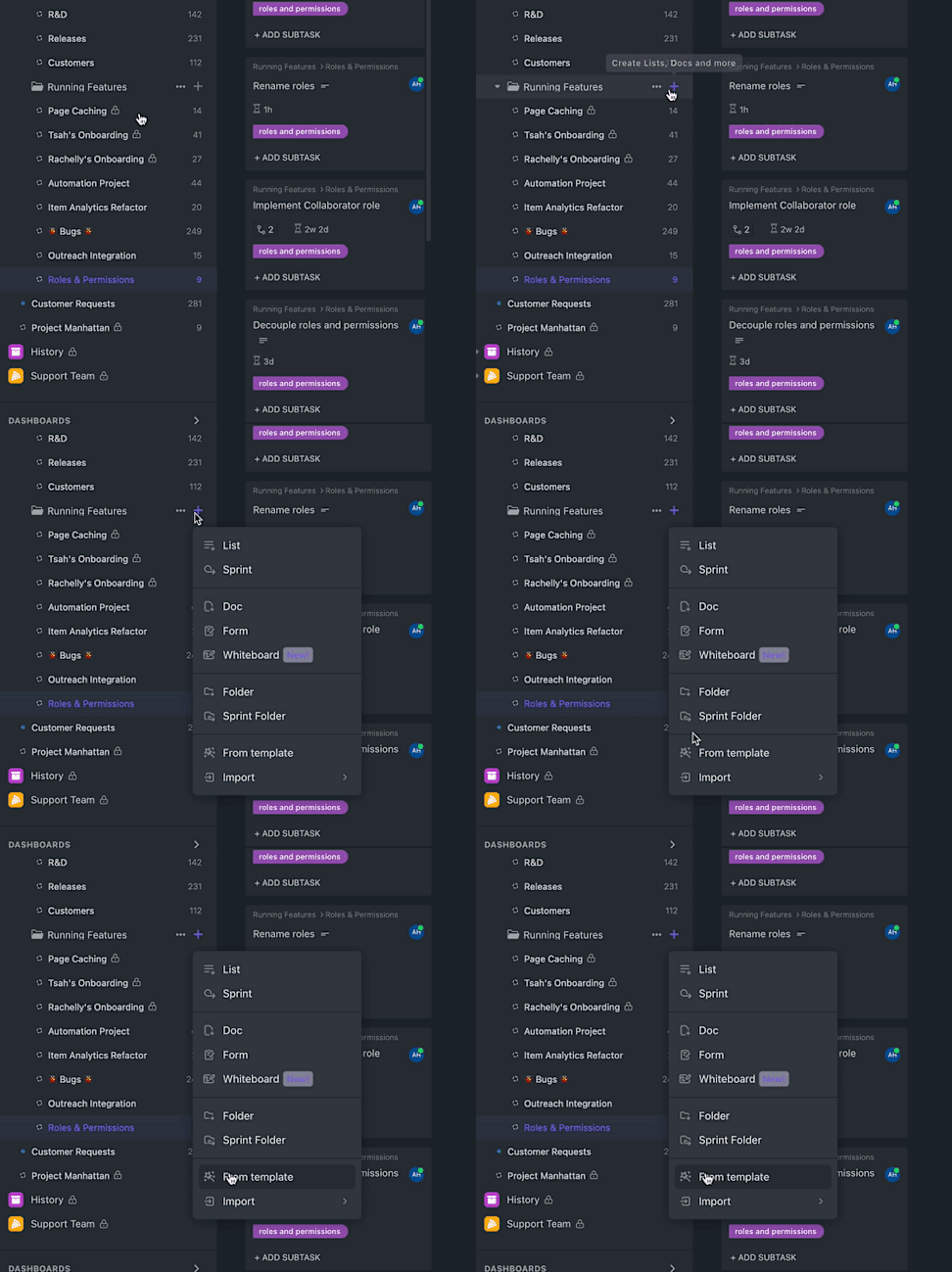
Step 1

On the "Running Project" Folder, Click on "+" -> "From Template"

Everything you need to build your leading page in one place

Start growing in half the time with an all-in-one board builder.No more long hours spent on development!

Introducing new way to create buyer experiences

Create professional, powerful and, interactive experiences for your buyers

Everything you need to build your leading page in one place

Start growing in half the time with an all-in-one board builder.No more long hours spent on development!
keyboard

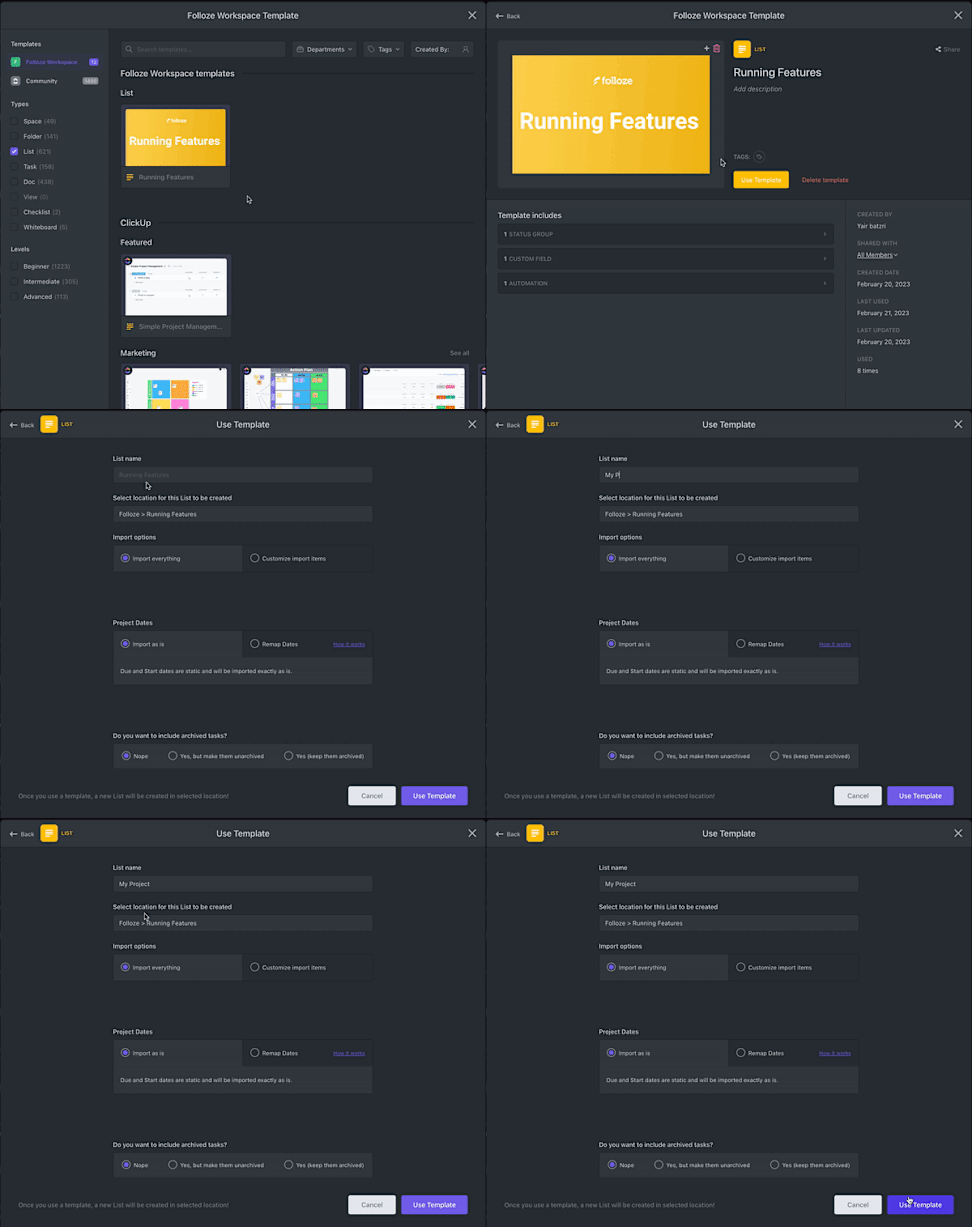
Step 2

  • Select the "Running Features" template
  • Click on "Use Template"
  • Name your project
  • Click on "Use Template" again

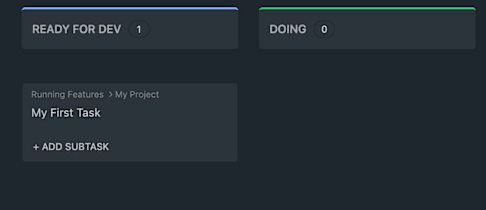
Thats it.

  • Every new task will be opened in "Ready for Dev", but will not be visible in the R&D list.
  • Once you move your task to "DOING" - It will appear in R&D as well
  • There's no need to duplicate or manually add tasks! You can work on your tasks from both R&D and project lists.
  • Remember to use Task Templates.

-"Don't take our word for it"-

"I have tried other products that worked fine, but this one is certainly the best of them all. It brings efficiency to a new level of simplicity."
John Smith, CEO at Big

Everything you need to build your leading page in one place

Start growing in half the time with an all-in-one board builder.No more long hours spent on development!

Useful Links